Private beta now open for macOS

The GIS workbench
that shows its work.

Pull your ArcGIS layers onto your own machine, ask questions in plain English, and get answers with the SQL behind them. Then print the map, publish the layer, or push the edits back.

  • ArcGIS Online and Enterprise
  • Runs on your machine
  • Your choice of AI model
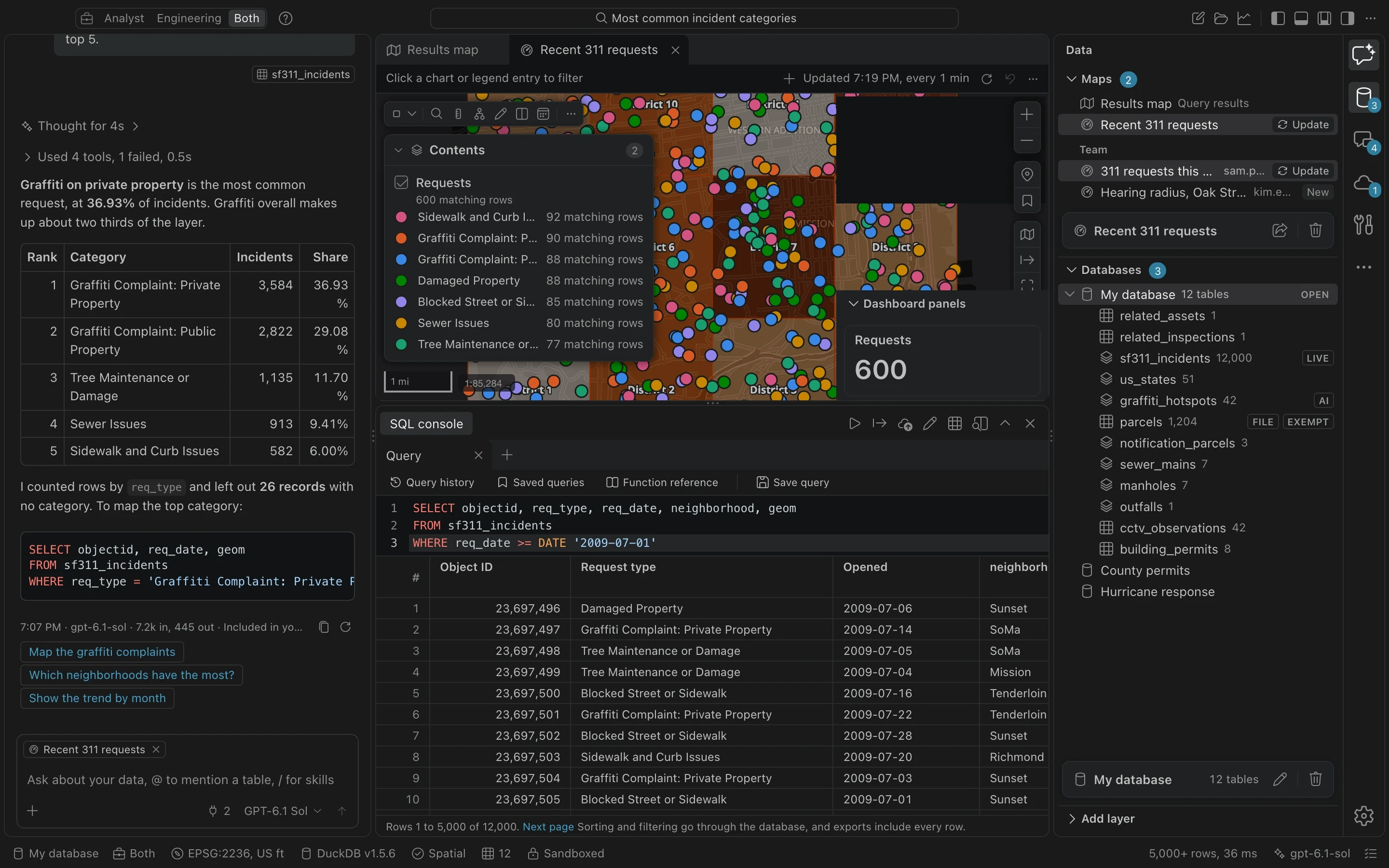
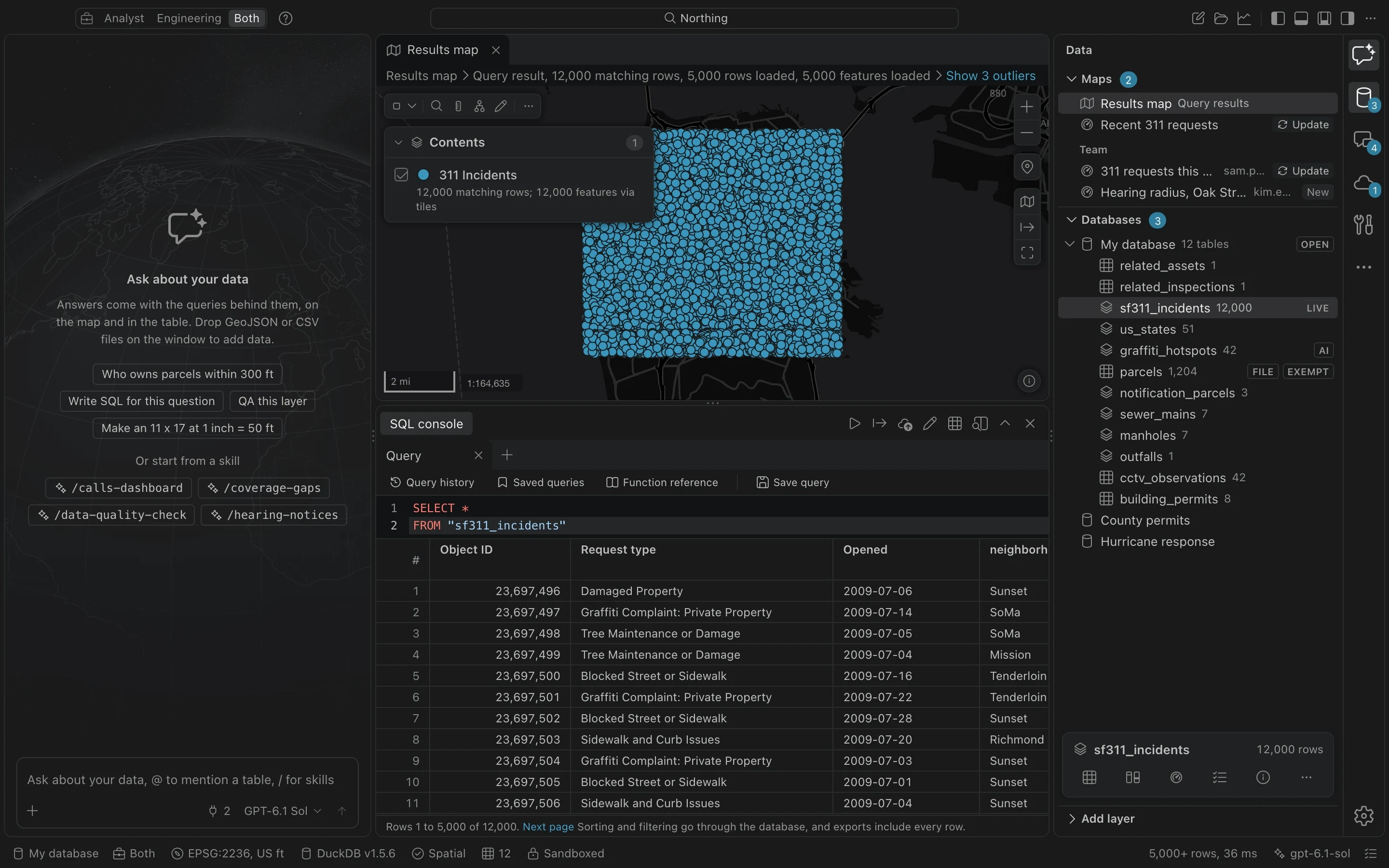
Northing's workbench: the assistant explaining the most common 311 request types with a table and the SQL it ran, the results drawn on a map, and the query results in the SQL console.
How it works

Pull. Work. Push.

ArcGIS stays your system of record. Northing is the workbench beside it: fast, private, and happy to work without a connection.

ArcGIS Online or Enterprise

services.arcgis.com

  • Parcels313,734
  • Address points277,214
  • Street centerlines39,346
  • Water mains18,902

Your computer

workspace.duckdb

SELECT p.owner, p.site_addr

FROM parcels p

WHERE dwithin_ft(p.geom, :site, 500)

313,734parcels, local
Offlineno signal needed
0 bytessent anywhere

Back to ArcGIS

your org, your sharing rules

  • Hearing radius web mapPublished
  • Hydrant inspections12 edits, reviewed
  • Notification parcelsHosted layer
  1. 01

    Pull

    Bring layers in from ArcGIS Online, ArcGIS Enterprise or any GIS file. Schemas, domains, coordinate systems and Z and M values come with them, and every table remembers where it came from.

  2. 02

    Work

    Everything runs on your machine in an embedded spatial database. Queries over a whole county's parcels come back in moments, offline too, and nothing leaves your computer unless you send it.

  3. 03

    Push

    Publish results as hosted layers and web maps, or push edits back to the source layer after a line by line review. Conflicts are caught first, and every push can be reversed.

The assistant

Ask in plain English. Check every step.

Most AI tools hand you an answer and hope you trust it. Northing's assistant works the way an analyst does, in the open: it looks at your tables, writes the query, runs it, and shows you all of it.

  • Every answer shows its query

    Each step the assistant takes is listed, with the SQL it ran. Open it, edit it, rerun it in the console.

  • It cannot change your data

    Queries are read-only. Results become new tables you choose to keep; existing tables are never altered.

  • Your model, your keys

    Claude, OpenAI, a ChatGPT plan, Azure OpenAI (including Government), Amazon Bedrock (including GovCloud), or a model running on your own machine.

  • A record of every request

    Prompts, responses and the tables each tool touched go into a tamper-evident log built for public records retention.

Maps

Real maps, all the way to paper.

Northing is not a chat window with a map attached. It is a full map workbench, with the symbology, labeling, layouts and print controls a GIS shop relies on every day.

Style it the way you would in Pro.

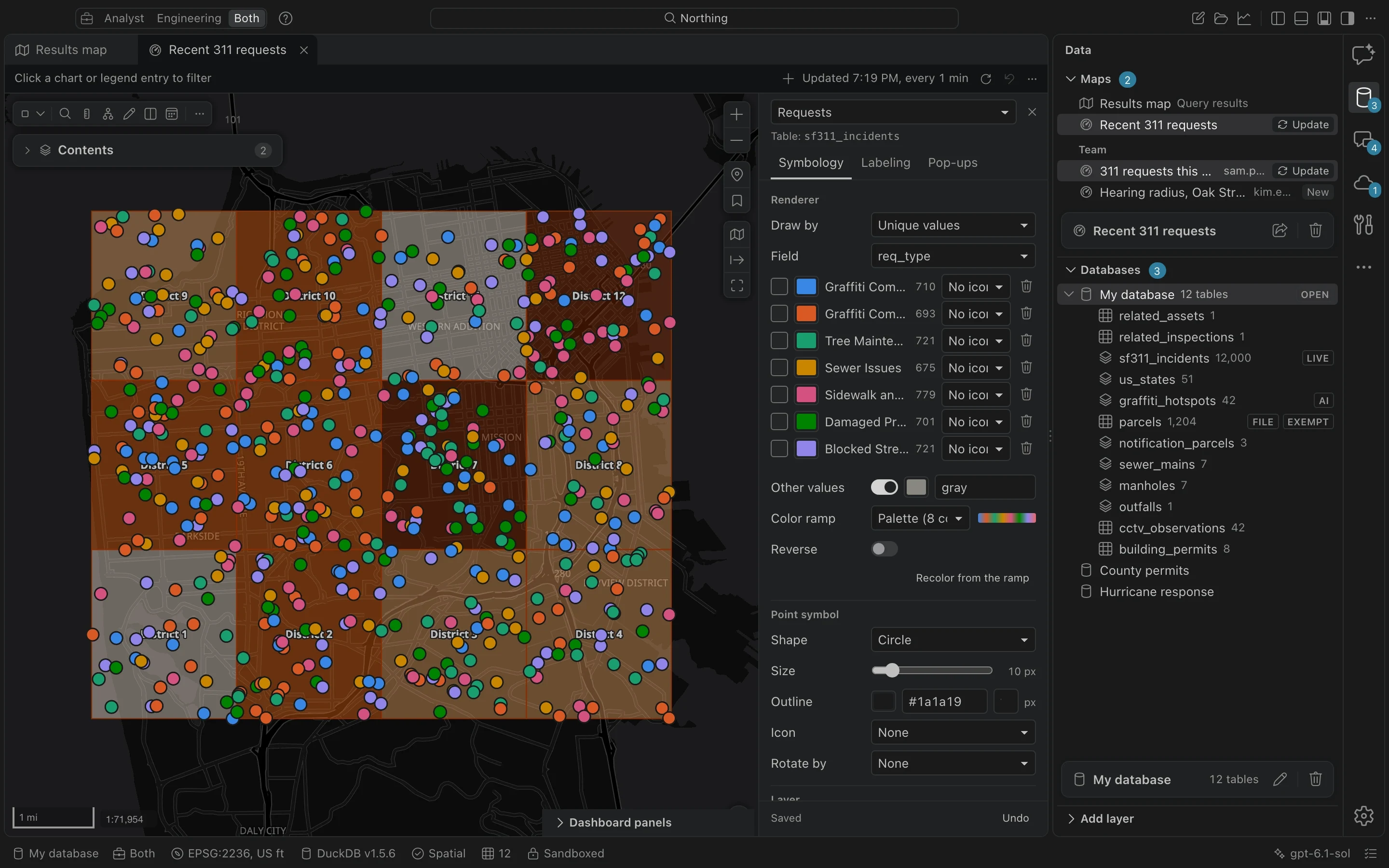
Unique values, graduated colors with natural breaks or quantiles, proportional symbols and heat maps, with ColorBrewer ramps, hatches and your own SVG icons. Every edit previews instantly and carries into the web maps you publish.

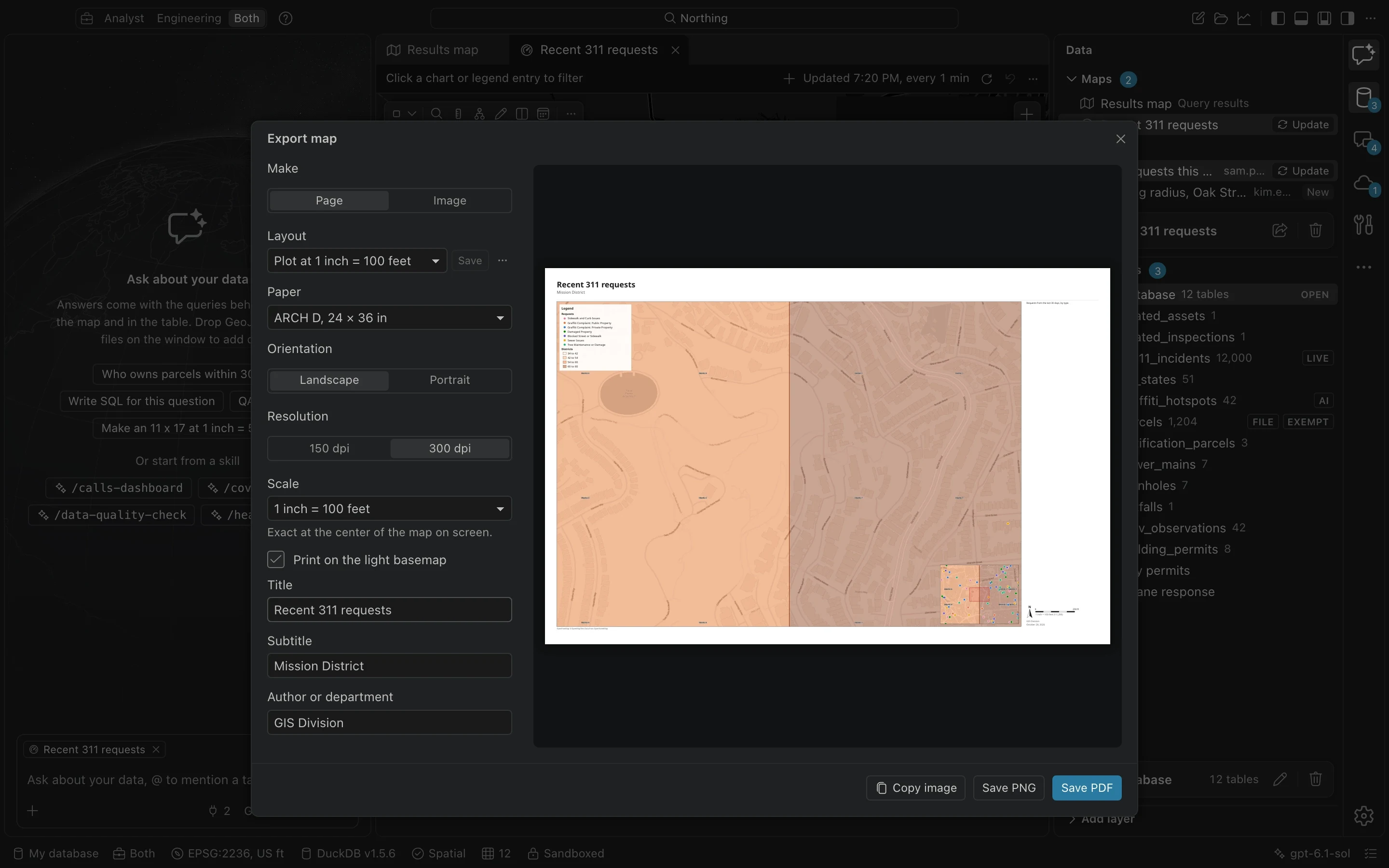
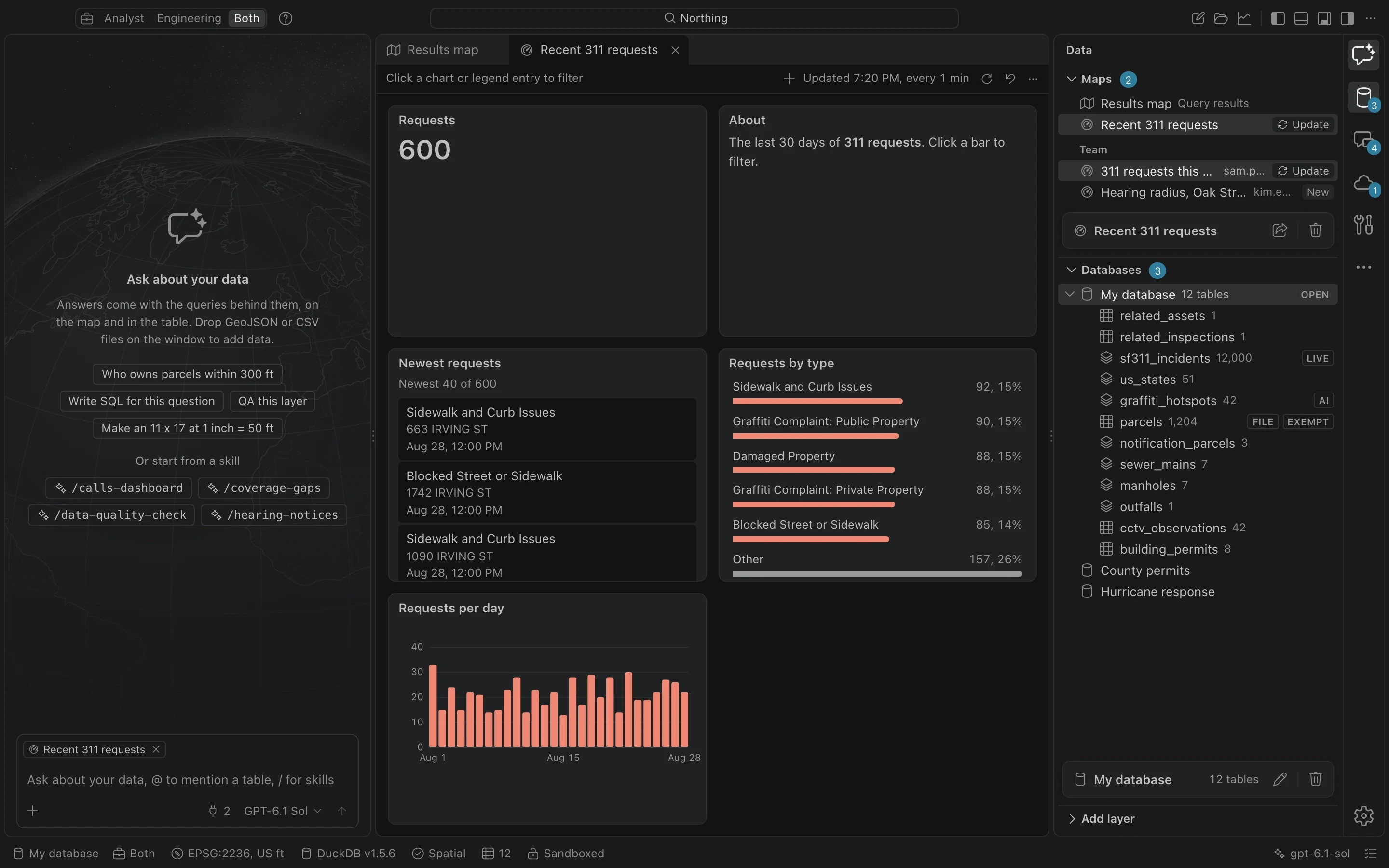
A saved map of 311 requests drawn by request type, with the layer properties pane open on Symbology.The Export map dialog with a 24 by 36 inch page at 1 inch equals 100 feet and a live print preview.A saved map shown as a dashboard of linked panels: a request count, a list of newest requests and requests by type.The attribute table of 12,000 311 incidents under the results map.
  • Label classes

    Several label classes per layer, each with its own SQL condition, halo and placement.

  • Pop-ups

    Choose fields, order, labels and number formats; they publish as the web map's pop-ups.

  • Imagery and tiles

    ImageServer, tiled and vector tile services, WMS, WMTS, XYZ, GeoTIFF and PMTiles.

  • Offline basemaps

    A county PMTiles file draws with no network at all, labels and print included.

  • Elevation

    Profiles, hillshade and contours from a local DEM or USGS 3DEP, with the vertical datum stated.

  • Flood context

    Pull FEMA flood hazard zones for the map area and check sites against them.

For public agencies

Built for the rules your office works under.

City and county GIS shops answer to public records law, protect sensitive data, and run on networks IT keeps locked down. Northing was designed around all three from the start.

AI records

A log a records custodian can stand behind.

Every model request is recorded: the prompt, the response, the model and version, the computer account, and every table and host a tool touched. Each line carries the fingerprint of the one before it, so an edit or deletion shows. Retention follows your records schedule, and a legal hold stops every deletion.

  1. 09:41:07Prompt and tool results3f9a…c12e
  2. 09:41:09Query on parcels (values withheld)a71d…09bf
  3. 09:41:12Response, model version5c28…e7a4
  4. 09:43:30Output saved as a tablee04b…3d61
  5. Chain verified, 4 of 4 records
Sensitivity tags

Sensitive tables stay out of models and off the public web.

  • PublicUsable everywhere, publishable to anyone.
  • InternalNever published or shared with everyone.
  • ExemptModels see columns and counts, never the rows.
  • CJIOnly reaches endpoints IT has marked CJIS capable.
IT policy

One policy file, enforced on every machine.

{
  "ai": {
    "allowedProviders": ["azure_openai", "local_openai"],
    "schemaOnly": false
  },
  "sensitivity": [
    { "tables": ["owners*"], "tag": "exempt" }
  ],
  "blockedSources": ["overture_places"]
}
Locked-down networks

Works where most cloud tools give up.

Every outside data source stays off until someone allows it. Northing reads the system proxy, trusts the certificates your security team installs, signs in to Enterprise with the account already on the machine, and keeps working with no connection at all.

  • Offline county basemaps
  • System proxies and PAC files
  • TLS inspection certificates
  • Windows and Kerberos sign-in
  • Client certificates from the OS store
  • Air-gapped license files
And everything around it

The daily work, covered.

From the file someone emailed you to the edit that goes back to the server, the parts of GIS work that eat the afternoon are built in.

  • Feature services
  • Shapefile
  • GeoPackage
  • File geodatabase
  • KML and KMZ
  • GeoJSON
  • GeoParquet
  • FlatGeobuf
  • CSV
  • Excel
  • DXF drawings
  • GPX
  • MapInfo
  • GML
  • Web maps
  • PMTiles
  • GeoTIFF
  • Change tracking

    See every edit since the last pull, field by field, before anything goes back.

  • Quality checks

    Required fields, domains, duplicates and topology rules, with each problem on the map.

  • State Plane native

    Layers keep their own coordinate system; distances and areas come out in feet.

  • Geoprocessing

    Buffer, clip, dissolve, spatial join and more, each previewing its SQL first.

  • Utility networks

    Trace upstream and downstream through pipes and valves on your own data.

  • Notification letters

    Parcels within a radius to mailing labels on Avery sheets, sorted by ZIP.

  • Team folder

    Share saved maps and recipes on a network drive, with their data dependencies.

  • Recipes

    Turn a repeated job into a recipe and run it on a schedule or from the command line.

Browse all of it in the docs

Be one of the first teams on Northing.

The private beta is open to GIS analysts and engineers on ArcGIS Online or Enterprise. Tell us about your work, and we will send you a license key.